
Mobile Usability Checker – Test Your Website’s Mobile Friendliness

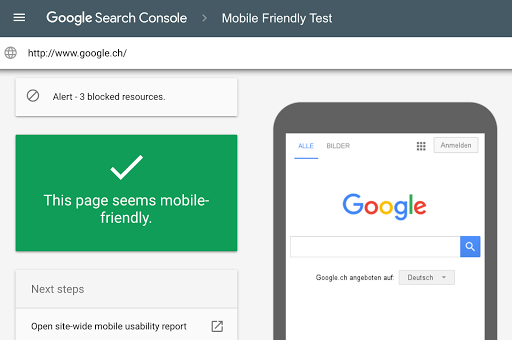

A Mobile Usability Checker is an online tool that helps you test whether your website is mobile-friendly and easy to use on smartphones and tablets. Since most users now browse the internet using mobile devices, having a responsive and optimized website is essential for success.
Search engines like Google give higher priority to mobile-friendly websites. If your site is difficult to read, slow, or hard to navigate on mobile, it may lose rankings, traffic, and customers. Our free Mobile Usability
Search engines like Google give higher priority to mobile-friendly websites. If your site is difficult to read, slow, or hard to navigate on mobile, it may lose rankings, traffic, and customers. Our free Mobile Usability Checker Tool analyzes your website and identifies common mobile issues.
With this tool, you can quickly check your site’s performance and improve user experience.
Why Is Mobile Usability Important?
Good mobile usability helps you:
✔ Improve Google rankings (Mobile-First Indexing)
✔ Increase visitor engagement
✔ Reduce bounce rate
✔ Boost conversions and sales
✔ Provide better user experience
✔ Avoid SEO penalties
A mobile-friendly website builds trust and keeps users longer.
How Our Mobile Usability Checker Works
The tool scans your website and checks important mobile factors. Steps to use:
Enter your website URL
Click the Check Mobile Usability button
The tool analyzes your page
View detailed mobile issues and status
No technical skills or registration is required.
Benefits of Using Our Tool
100% Free and unlimited use
Fast and accurate analysis
Detects mobile usability errors
Works on all devices
No login needed
Secure and private
This tool is useful for bloggers, businesses, and developers.
📌 Common Mobile Usability Issues
Our tool helps detect problems such as:
Text too small to read
Buttons too close together
Content wider than screen
Slow loading speed
Unresponsive layouts
Horizontal scrolling
Fixing these issues improves user satisfaction.
Tips to Improve Mobile Usability
Follow these best practices:
Use responsive design
Optimize images
Increase font size
Improve page speed
Test on multiple devices
Use simple navigation
Regular testing keeps your website competitive.
Frequently Asked Questions (FAQs)
1. What is a mobile usability checker?
A mobile usability checker tests whether a website is easy to use on mobile devices.
2. Is this tool free to use?
Yes, this mobile usability checker is completely free with no limits.
3. Does mobile usability affect SEO?
Yes, Google prefers mobile-friendly websites and ranks them higher.
4. Can I test any website?
Yes, you can check almost any public website URL.
5. Is my website data stored?
No, all checks are private and not saved.